
You are using an out of date browser. It may not display this or other websites correctly.
You should upgrade or use an alternative browser.
You should upgrade or use an alternative browser.
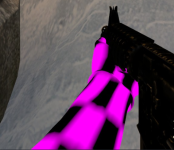
Resolved m4a4 texture doing a silly
- Thread starter anna
- Start date
- Status
- Not open for further replies.


S
Sure Lock Homes
Guest
https://steamcommunity.com/sharedfiles/filedetails/?id=2002193571
Downloading this on the workshop fixed it for me
Downloading this on the workshop fixed it for me

Looking into this. @Sure Lock Homes I ripped the materials from that exact workshop addon and updated our content pack and it fixed it for me but I'm not sure why it isn't working for everyone.
I updated the M4A4 texture earlier today as to not conflict with the M16 texture. After restarting your GMod to apply that fix, are the hands still missing?


uintancæstir
Member
This gun's arm model calls for "tm_arms_leet.vtf" "materials\models\weapons\v_models\arms"
They work with My Dime Is Up's workshop addon enabled, but it might be that for someone
joining the server without being subscribed to any of the addons the arms don't seem to auto download.
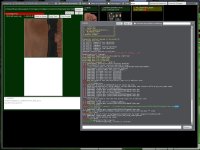
Using the command "mat_texture_list", clicking "Show ALL Textures", then selecting "Where Is" on "tm_arms_leet.vtf" it says:
'Giant's Lair Modded TTT Weapons' - D:\SteamLibrary\steamapps\workshop\content\4000\3489487718/gmpublisher.gma
Also the textures "rif_m4a1.vtf" & "rif_m4a1_exponent.vtf" for the M4A4 are still located in "Giant's Lair Weapons"
'Giant's Lair Weapons' - D:\SteamLibrary\steamapps\workshop\content\4000\3554565630/gmpublisher.gma
They work with My Dime Is Up's workshop addon enabled, but it might be that for someone
joining the server without being subscribed to any of the addons the arms don't seem to auto download.
Using the command "mat_texture_list", clicking "Show ALL Textures", then selecting "Where Is" on "tm_arms_leet.vtf" it says:
'Giant's Lair Modded TTT Weapons' - D:\SteamLibrary\steamapps\workshop\content\4000\3489487718/gmpublisher.gma
Also the textures "rif_m4a1.vtf" & "rif_m4a1_exponent.vtf" for the M4A4 are still located in "Giant's Lair Weapons"
'Giant's Lair Weapons' - D:\SteamLibrary\steamapps\workshop\content\4000\3554565630/gmpublisher.gma
Last edited:
With the fix from @uintancæstir and some worksho updates, can you confirm if this issue is still present following the rollout of the April Update Package? I'll close this if this is no longer an issue or there is no response within the next week.


can we just make @uintancæstir a dev already
Solved.
- Status
- Not open for further replies.